Wednesday, September 4, 2013

Installing Composer on XAMPP Windows 7

Download the Composer setup Composer-Setup.exe

Run it.

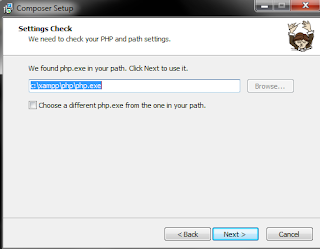
Give it the location of the php executable i.e php.exe, im my case it was at c:\xampp\php\php.exe (XAMPP was installed at default location  i.e. c:\xampp\)


If you get the Composer Error [ERR_DOWNLOAD]: Composer was not downloaded error,


here's what I did to resolve it:

Open up the Control Panel and go to:

Control Panel\System and Security\System


(or click the Win+Pause key to invoke it)

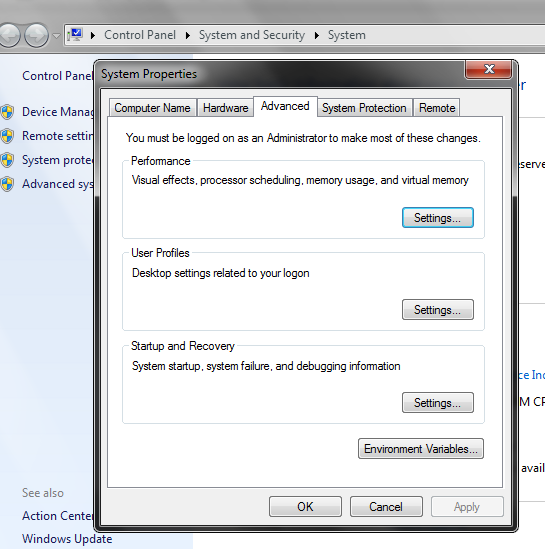
Goto Advanced system settings


that will open up System Properties


Click on Environment Variables button


Seelct the 'PATH' and click Edit


Add the line below to the end of what's contained in Variable value (if you just copy paste it then it will replace the values already present there, so be careful!)

;c:\xampp\php\;C:\ProgramData\Composer\bin

Click Ok, Ok, Ok

Open up c:\xampp\php in Windows Explorer (NOT Internet Explorer! Windows Explorer is the file manager of Windows OS) and open up php.ini in Notepad (I'm using SynWrite)


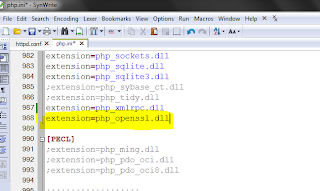
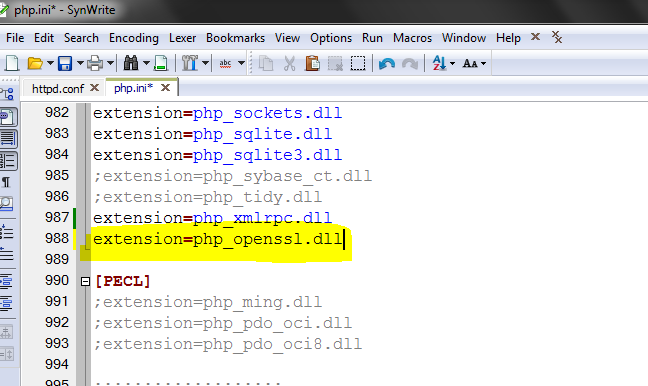
Next, find the Dynamic Extensions section:


Add this line to the end:

extension=php_openssl.dll


Save and Exit.

Go back to the Composer-Setup.exe and click Retry (Run it gain if you have closed it, give it the location of php.exe as described above and finish the setup, it should 'complete' happily now :) Well, mine did!


Log Out and Log In again to make it work.

Testing from the Command Prompt (just type composer from any directory):


Yay! Peace.

Now, back to Laravel.


Thursday, July 14, 2011

Who's Afraid of the Public Domain? -by Peter Saint-Andre


Version:1.3
First Published:2006-11-26
Last Updated:2008-08-28


Introduction

You know who you are. You like to write, compose, draw, paint, sculpt, photograph, perform, or engage in some other creative activity. You are what I call a creative individual.
Most people make five assumptions about creative individuals:
  1. Creative individuals would not produce their works without the possibility of making money from them.
  2. Creative individuals are endowed with the inalienable right to control who may copy or modify those works, since without that "copyright" they would not be able to make money from their creative output.
  3. Copyright is a straightforward extension of physical property rights and therefore a creative work is a form of intellectual property.
  4. To protect the rights of creative individuals, governments may legitimately prevent others from copying or modifying creative works.
  5. It is only government-enforced copyright that keeps a creative work safe from the ravages of violation and abuse; when it is no longer so protected, it lapses into a fearsome state of desuetude and disregard called the public domain.
These assumptions seem as natural as the air we breathe. I know, because I made them, too. My creative activities -- writing, composing, and the like -- are a large part of who I am, and I didn't want others to profit from or modify my works. Yet slowly but surely I began to question those assumptions. Eventually I overcame completely my fear of the public domain, but only after a great deal of reading and thinking about the history of copyright law, the nature of creative products, and the implications of our ongoing technology revolutions [1]. Although I place all of my personal works [2] in the public domain, I know that the decision to do so is not easy. I've written this essay to share my conclusions so that you can at least appreciate the importance of the public domain to the future of our culture. If you decide to place your works in the public domain, so much the better.

Wherein We Meet the Muse

OK, enough about me. Let's talk about you.
Why do you create? Think back to when you first played an instrument or picked up a pen. Was your fascination with your favorite creative endeavor driven by the desire for money? I doubt it. First of all, there are plenty of easier ways to make money than by penning poems, composing music, writing essays, or blogging -- selling insurance comes to mind. I bet you create because you take great pleasure in the activity itself, because you feel an inner compulsion to create, or simply because you can't help it: it feels as if you were you were born that way and you can't imagine life without your favorite creative activity. The ancients had a name for this non-monetary source of inspiration: The Muse.
That's not to say you don't also have more temporal motivations; but in my experience those motivations are seldom primary, in large part because of the sheer dedication to your craft that is needed (often from an early age) to truly excel in creative production. The drive to create comes first, and only later do you discover that as a result of creation can come fame, fortune, power, and prestige. Indeed, I would hazard that most creative individuals never seek to make a living from their creative output; granted, such individuals are typically the equivalent of Sunday composers, but even some well-known writers and composers (such as William Carlos Williams and Charles Ives) have made their living in other professions and have pursued their creative endeavors on the side. (I, too, have followed this path, which is one reason why I have been so open to questioning copyright -- I never expected to make money from my creative endeavors in the first place.)

Production and Publication

Creative individuals don't merely produce works; they also publish them. In the original sense of "making public", publishing can take many forms: a book, a manuscript, a recording, a recitation, a performance, a transformation into another medium. Some results of publication are physical objects, and some physical objects can be more or less easily copied (compare a single poem to a long novel; compare that novel to a larger-than life statue). Other instances of making public are experiential processes, which given the current state of technology cannot be fully captured in a physical object since they require the human presence of both producer and consumer (musical performances, poetry readings, theater plays, and the like); here, part of the attraction is precisely the human element that cannot be duplicated outside the time and place of performance.
Thus the fact that a work has been made public does not imply that it is amenable to copying. What determines whether a work can be copied is technology. Prior to the development of writing, a poem or myth could be "copied" only by memorizing it, thus enabling one to recite it at will. Prior to the invention of movable type, a written work could be copied (at least during the European Middle Ages) only by visiting a scriptorium in which the work resided and laboriously copying out the manuscript by hand. Prior to the invention of digital storage, retrieval, and publishing (especially the Internet), the ability to copy large texts, images, and audio and video recordings was effectively limited to large-scale publishing and media companies; now that ability is distributed across the world. Although today we are accustomed to live audio and video recordings, we know that they are but a pale reflection of being there (those who experience a concert or recitation or play don't feel cheated by the existence of a recording, since it is not a faithful copy of the original experience); thus the livelihood of performing artists, motivational speakers, and other experience-makers is not yet threatened by the ability to make copies.
Since the march of technological progress cannot be stopped, you may need to think creatively about cashing in on your creative activities (if indeed you want to). While I discuss some suggestions for doing so at the end of this essay, my point now is only that the current state of technology has a major impact on how you can make money from what you create.
Technology also has an impact on the ability of others to modify your works. As most creative individuals do, you probably have something of a parental attitude toward your creations. You may worry more about someone modifying your works than about someone copying your works. For instance, if you write a song or create an image, you don't want someone else to palm it off as their own. Yet here publication is your friend. If you publish early and publish often (especially on the Internet with its "way back machines" and ubiquitous search engines), it becomes more difficult for someone else to claim that they created what you did. With effectively the whole world watching, plagiarism is hard to pull off (as many college students have discovered to their chagrin).

What is Properly Property

Do you own what you've created? It's a tempting thought. After all, you brought it into being. If the analogy of parenthood is appropriate, think of it this way: do parents own their children? Well, no. They have a special interest in their children, but they don't own or even, after a certain amount of time, control or influence them. Children eventually lead separate lives, and so do creative works. This becomes painfully clear when you die. Shakespeare, Beethoven, and other famous creators no longer exercise any control over their works (their heirs might like to, but that's another matter).
In this way, children and creative works are unlike physical property. The house I own today could be maintained, improved upon, transferred, and re-sold to the end of time, all the while being privately owned. By contrast, when I publish ("make public") a poem on my website, in a way it immediately becomes public property, since anyone could memorize it, recite it, write it down on a slip of paper, copy it to an e-reader, cache it on their hard drive, or otherwise "inhabit" it without harming me in the least.
Thomas Jefferson captured this concept as follows:
He who receives an idea from me, receives instruction himself without lessening mine; as he who lights his taper at mine, receives light without darkening me. That ideas should freely spread from one to another over the globe, for the moral and mutual instruction of man, and improvement of his condition, seems to have been peculiarly and benevolently designed by nature, when she made them, like fire, expansible over all space, without lessening their density in any point, and like the air in which we breathe, move, and have our physical being, incapable of confinement or exclusive appropriation. Inventions then cannot, in nature, be a subject of property.

A Monopoly by Any Other Name

Jefferson went on to write:
Society may give an exclusive right to the profits arising from them [i.e., inventions], as an encouragement to men to pursue ideas which may produce utility, but this may or may not be done, according to the will and convenience of the society, without claim or complaint from any body.
Notice that the "right" to the profits arising from an idea is granted by society. It is not a natural right, since natural rights never expire (e.g., the right of someone to own my house does not expire but instead is passed on through transfer or sale). So unless you believe in perpetual limits over who may copy or modify your works, you cannot maintain that copyright is a right at all. In fact copyright is a government-granted privilege of monopoly power over making copies and modifications to a work. Sure, if you are a Sunday composer or a small-time blogger then it's a minor monopoly, but it's a monopoly nonetheless. I don't know about you, but I don't particularly want to be a monopolist of any kind.

A Fearsome Desuetude

When the government-granted privilege of monopoly power that we call copyright expires, your work passes into the public domain. It sounds like a horrible fate, doesn't it? Once your work is in the public domain, anyone can copy it or modify it without your approval.
Yet the public domain is nothing to fear. The works of Homer, Sophocles, Confucius, Plato, Aristotle, Dante, Shakespeare, Galileo, Newton, Bach, Beethoven, and other creative giants are all in the public domain. Their works are revered, not reviled. Sure, the fact that the Fifth Symphony is in the public domain enabled Chuck Berry to write "Roll Over Beethoven"; but far from defiling Beethoven's good name, Berry's song indicates the level of respect that we still have for Beethoven's works. I bet you'd love it for your works to be similarly known and respected two hundred years from now (what creative individual wouldn't?).
But certain commercial interests, such as the large media companies, do think that the public domain is a fate worse than death for their creative products (in fact, copyright was developed not to protect the creative interests of authors but to protect the commercial interests of printers and publishers [3]). That's why those media companies have bought off the American Congress to continually extend the length of their monopoly privileges. For example, if you're a 30-year-old American today and you live to age 90, your copyrighted work won't pass into the public domain until 2136 -- unless of course the Congress extends the copyright terms again, which it is very likely to do when the earliest Mickey Mouse films are once again due to enter the public domain.
Because of that corporate influence over the copyright laws (at least in America), you face a choice: accept that your works will never pass into the public domain, or willingly place them there. You can place your works into the public domain immediately (as I have done) or specify in your will that your works shall pass into the public domain upon your death. I find it simpler to place my works in the public domain as soon as I publish them, but only you can decide the best course of action for your own works.

Thinking Creatively about the Creative Life

At this point you may be wondering: am I crazy? Have I willingly given up all possibility of benefiting from my creative activities?
Well, not so fast. Just because my works are in the public domain doesn't mean that I couldn't sell them in certain forms. I could publish physical books containing my writings (yes, some folks still buy books), perhaps autographing them to give them unique value. I could give readings of my poems. I could perform my songs in concert. I could sell T-shirts and calendars and other paraphernalia. I could give seminars on blogging or songwriting. In short, I could sell objects and experiences for which there is demand even if my words and music are in the public domain (no comparison of stature intended, but people do it with Shakespeare and Beethoven, so why not with me?).
I freely grant that in some situations and domains it might be more difficult for individuals to cash in on their creations. If you're a non-performing composer or a mute poet, you can't give performances -- though you could teach, write instructional manuals, sell merchandise, and find a collaborator to present your authorized performances. And placing your works in the public domain means that anyone can publish or perform them without compensating you (one solution, used by J.R.R. Tolkien in response to unauthorized copies of The Lord of the Rings in America, was to ask his readers to purchase the book only from his authorized publisher -- which happened to be great publicity! [4]).
The state of technology for the last 500 years has made the creative life relatively easier for you if you're a writer or composer (out with fickle patrons, in with the buying public), and for the last 100 years if you're an actor or musical performer. Yet technology moves on, introducing new challenges and new opportunities.
One of those challenges is the impending death of copyright (or at least the ability to enforce copyright without seriously invading the privacy of those who enjoy your works). Why try to forestall the inevitable when instead you can place your works in the public domain? [5] Personally I think that you're up to the challenge and that you can apply your considerable creativity to the task of successfully living the creative life without the coercive safety net of a government-granted monopoly over copying and modifying your works. It might be difficult, but no one ever said the creative life was easy. That's why being a creative person is such a badge of honor. And it's a lot more fun than selling insurance, isn't it?

Notes

[2] By "personal works" I mean all the works that I publish at my personal Internet domains (ismbook.com, monadnock.net, and stpeter.im). By day I mainly write Internet protocol specifications for the XMPP Standards Foundation, whose documents are published under the Creative Commons Attribution License; I also write specifications for the Internet Engineering Task Force, articles for professional journals, books for technical publishers, and whitepapers for my employer, but unfortunately the publication policies of these entities are not as liberal as I would prefer.

Revision History

1.3 (2008-08-28): Corrected several errors and updated several links.
1.2 (2007-05-23). Added links to my blog and to QuestionCopyright.org.
1.1 (2006-12-30). Added footnotes regarding my personal works and regarding methods for placing works in the public domain.
1.0 (2006-11-26): Initial version
Saturday, January 22, 2011

TCP/IP Basics

The IP address
An IP address in the most common format (named "IPv4") is a four bytes expression dot-divided.
In an IP address the 4 bytes are represented by their value, there are 4 numbers from 0 to 255 in a format like: «192.168.183.15»
An IP address must be unique in a network, and the Internet is a network.
The IP address can be read from left to right, defining the address like in Country, Town, Street, Street Number.
The Netmask
Bundled with an IP address there is always a "Netmask" value. The Netmask, together with the IP address, defines the network the computer belongs to, that is which other IP addresses the computer can touch directly in the same LAN.
In order to understand the Netmask we will always remember that the 4 bytes defining both the IP address and the Netmask could be represented in binary format.
The netmask is -by definition- a sequence of "1" from the left to the right, followed by some number of "0" (the network range). Because of this rule the netmask is often represented with decimal values, that sound like one or more "255" followed by one or more "0".

By representing in binary format the current IP address we can actually "mask" the bits corresponding to a "1" in the netmask, and understand that all other bits unmasked (corresponding to "0") are valid addresses in the same physical network.

Network
Given the IP address and the netmask, a range of addresses that are considered "local" is then given, and this range is named "network".
All the IP addresses in the same network have the same trailing bits in the address value (that ones masked by "1" in the netmask), and different leading bits that will be unique across the network (that ones masked by "0").

Because of its definition a netmask is a sequence of 1 followed by a sequence of 0, then sometimes instead of writing "255.255.255.0" (in order to indicate a netmask of 24 "1" followed by 8 "0") it is exactly the same thing if we simply report the number of "1". In this case an address like "192.168.183.15/255.255.255.0" becomes "192.168.183.15/24".

Following the given example (192.168.183.15/24) we have a network where "192.168.183" is fixed, while the last byte can vary between 0 and 255.
The very first available address in the range (with 0-valued bits where the netmask is 0) is named "network address", while the very last address in the range (with 1-valued bits where the netmask is 1) is named "broadcast address".

In our example we have:
• address: 192.168.183.15/24
• network: 192.168.183.0/24
• broadcast: 192.168.183.255

By using the IP calculator (linked in the right column of this page) it is easy enough to locate network and broadcast addresses for the given network, depending on IP address and netmask.
Network address and Broadcast address can not be used in the network for computers and/or other networ devices: they are reserved.

In the following picture the example examined above:

Network classes
The numeric values for IP and netmask define perfectly the network, by the way it is easier for humans to have a more comfortable way to indicate "a network class where only the first byte is fixed" rather than "/8" or "/255.0.0.0": a class like this is named "class A".

o class A
netmask is 255.0.0.0 ⇒ /8 ⇒ 16,777,216 (16M) available IP values

o class B
netmask is 255.255.0.0 ⇒ /16 ⇒ 65,536 (64K) available IP values

o class C
netmask is 255.255.255.0 ⇒ /24 ⇒ 256 available IP values

Obviously in the total number of available values are also included network and broadcast addresses, and this reduces by 2 the total number of IP addresses actually available in the class.
Reserved IP classes
The Internet is a unique network, then some agreement is needed in order to spread the same logic across the world. One of them is about reserved IP classes.
There are several IP classess that are reserved for various purposes, including private use (to be used within a LAN) and more.
A list of reserved IP classes follows:

x 127.0.0.0/8 ⇒ Loopback class
the entire class A beginning with 127. is reserved for loopback, then every machine will solve in itself every address starting with 127.

x 10.0.0.0/8 ⇒ Private
the entire class A beginning with 10. is private, to be used in LANs

x 172.16.0.0/12 ⇒ Private
16 contiguos Class B, from 172.16.0.0/16 through 172.31.0.0/16, are also private.

x 192.168.0.0/16 ⇒ Private
256 contiguos Class C, from 192.168.0.0/24 through 192.168.255.0/24, are also private.

The network class we used in the above examples (192.168.183.0/24) is then a private class, to be used only in a LAN.

When choosing an IP class for our LAN (our own private network) we should consider that the network must have an IP class different from any other network it will be connected to.
A tipycal error is to use the 10.0.0.0/8 network, unfortunately there is only one class A private network available, then probably someone we will be connected to is already using it, and furthermore we probably do not need 16 millions of IP addresses.
A good choice for an home LAN is ine of the 256 available 192.168.0.0/16 C classes, i.e.: 192.168.47.0/24
Avoid the 192.168.0.0/24 class, because it is the first choice in the most part of home LANs, and for the same reason avoid both the 192.168.47 and the 192.168.183 examples we used here.

Source: http://www.faqintosh.com/risorse/en/guides/net/tcp/basic/

Friday, September 10, 2010

ROI (Return on Investment)

Your ROI is the measure of the profit you make and/or costs saved at your business. For your email marketing campaigns you calculate cost of sending email plus time.
ROI = [(Payback - Investment)/Investment)]*100
So if you made $780 on your email campaign, your time was worth $50 to create it and it costs $15 to send it it would look like this:
(($780 - $65)/$65)*100 = 1100% ROI (which is really good!)
If you want to take it a step further subtract your cost of your products or services as well.

Bill Gates speech: 11 rules your kids did not and will not learn in school


by Kent Summers on Wednesday, May 26, 2010 at 5:34pm
Rule 1: Life is not fair - get used to it!

Rule 2: The world doesn't care about your self-esteem. The world will expect you to accomplish something BEFORE you feel good about yourself.

Rule 3: You will NOT make $60,000 a year right out of high school. You won't be a vice-president with a car phone until you earn both.

Rule 4: If you think your teacher is tough, wait till you get a boss.

Rule 5: Flipping burgers is not beneath your dignity. Your Grandparents had a different word for burger flipping: they called it opportunity.

Rule 6: If you mess up, it's not your parents' fault, so don't whine about your mistakes, learn from them.

Rule 7: Before you were born, your parents weren't as boring as they are now. They got that way from paying your bills, cleaning your clothes and listening to you talk about how cool you thought you were. So before you save the rain forest from the parasites of your parent's generation, try delousing the closet in your own room.

Rule 8: Your school may have done away with winners and losers, but life HAS NOT. In some schools, they have abolished failing grades and they'll give you as MANY TIMES as you want to get the right answer. This doesn't bear the slightest resemblance to ANYTHING in real life.

Rule 9: Life is not divided into semesters. You don't get summers off and very few employers are interested in helping you FIND YOURSELF. Do that on your own time.

Rule 10: Television is NOT real life. In real life people actually have to leave the coffee shop and go to jobs.

Rule 11: Be nice to nerds. Chances are you'll end up working for one.

Thursday, December 10, 2009

10 Productivity Tips

When it comes to productivity, there’s a lot of misinformation available (both online and offline). You can hear different people saying different things, and they all claim to have discovered the definitive way to be productive. Unfortunately, they all seem to focus on doing more, and if you follow their methods, you may end up working more and enjoying your life less.

I think another reason this misinformation exists is because there’s a huge market around productivity. Everyone wants to make money with it and it’s hard to do it without following some expectations.
The following is a list of ten things they usually don’t teach you about productivity. It is based on my experience, but it should apply easily to everyone.
  1. Do less. The first productivity tip is to remember that you should eventually do less. It doesn’t make sense to adopt a system if that doesn’t save you time.
  2. Use a productivity system. Previously, I told you that most productivity systems are bad, but that shouldn’t stop you from building your own. For example, I have a software where I keep track of all my projects and tasks. I also use a separate daily to-do list where I write three or more high value activities I want to accomplish during the day. This works for me because I don’t want to see all my projects and tasks throughout the day, but instead I want to focus on the important things.
  3. Focus on important things. Do you remember the Pareto rule? If not, it basically states that 80% of results come from 20% of your actions. That means you should focus on doing the important things and procrastinate on low value activities, like checking emails, watching videos on YouTube, etc.
  4. Have a plan. It doesn’t make much sense for you to do anything if you don’t have a road map. Before doing anything, you should ask yourself if what you are going to do will move forward on your goals or not. Remember that if you do something everyday to achieve something big, you’ll eventually get there. Persistence and patience are your friends.
  5. Avoid starting new things. I usually have 2 or 3 new ideas I would like to implement every day, but I can’t do them all. If I did, I wouldn’t have the time to finish anything and my life would look like a big mess. As a general rule, when you have a great idea you would like to implement, write it down and return back to it after two days to see if it’s still valid.
  6. Use time box. When you have something to do, allow yourself to work on it for a specific amount of time, for example one hour. After that time is finished, you stop and move to something else. This is a tremendous productivity tip because when you work this way, your brain will do its best to finish the task before the time runs out. Try it.
  7. Don’t wait for motivation to come. Motivation is the reason why you do something, but it’s also the reason why you often procrastinate. When you would like to do something but you lack motivation to do it, what you should do is just get started. It’s easy to start doing something without focusing on the big task. As soon as you do it, motivation will come to complete the whole task.
  8. Do other activities. When you are stuck with a problem and you are going nowhere, consider taking a break, and walk outside to clear your mind. You’ll be amazed at how much faster you can solve your problems this way.
  9. Learn to relax. If your body is tense, it’s hard for it to function well. There are many relaxation techniques you can use, but the most common is probably to just lie down and enjoy a few minutes of silence without doing anything.
  10. Stop worrying about productivity and start doing it. This is probably the most important tip. If you want to do something, just go and do it; don’t worry about productivity.
I hope these tips will help you achieve some of your goals. Remember to keep experimenting to find what works for you. That’s the only way to figure out what’s best for you and not for everyone else.

SOURCE: http://bloggingwithsuccess.net/10-things-they-dont-teach-you-about-productivity

Monday, November 30, 2009

Consumer Surplus - MicroSoft's Marketing Windows Server 2008

It's sort of like if you were all set to buy that new merino wool sweater, and you thought it was going to cost $70, which is well worth it, and when you got to Banana Republic it was on sale for only $50! Now you have an extra $20 in found money that you would have been perfectly happy to give to the Banana Republicans!

Yipes!

That bothers good capitalists. Gosh darn it, if you're willing to do without it, well, give it to me! I can put it to good use, buying a SUV or condo or Mooney or yacht one of those other things capitalists buy!

In economist jargon, capitalists want to capture the consumer surplus.

Let's do this. Instead of charging $220, let's ask each of our customers if they are rich or if they are poor. If they say they're rich, we'll charge them $349. If they say they're poor, we'll charge them $220.

Now how much do we make? Back to Excel. Notice the quantities: we're still selling the same 233 copies, but the richest 42 customers, who were all willing to spend $349 or more, are being asked to spend $349. And our profits just went up! from $43K to about $48K! NICE!

Capture me some more of that consumer surplus stuff!

In an ideal world, the price would be different for every customer. The "perfect" pricing scheme would charge every customer a different amount, extracting from each one the maximum amount they are willing to pay.
The IT guy at Podunk Lutheran College has no money: Gratis.
The IT guy at a medium-sized real estate agency has some money: $500.
The IT guy at a Fortune 100 company has tons of money: $50,000.

You can never make your pricing "perfect," but you can do much better than simply setting one constant price for all situations. By carefully tuning all these details, you can find ways to charge more money from the people who are willing to pay more.

This sort of pricing seems exploitative, but it can also be an act of public good -- remember that the poorest customers are paying less; with a one-size-fits-all pricing policy, they might not be able to afford the product at all. Drug companies often follow the same pricing model when selling life-saving drugs to third-world countries. First-world countries end up subsidizing the massive costs of drug development, but the whole world benefits.

What I object to isn't the money involved, but the mental overhead. The whole thing runs so contrary to the spirit of Don't Make Me Think. Sure, don't make us customers think. Unless you want us to think about how much we'd like to pay you, that is.

And what are we paying for? The privilege of flipping the magic bits in the software that say "I am blah edition!" It's all so.. anticlimactic. All that effort, all that poring over complex feature charts and stressing out about pricing plans, and for what? Just to get the one simple, stupid thing I care about -- using all the memory in my server.

Perhaps these complaints, then, point to one unsung advantage of open source software:

Open source software only comes in one edition: awesome.

The money is irrelevant; the expensive resource here is my brain. If I choose open source, I don't have to think about licensing, feature matrices, or recurring billing. I know, I know, we don't use software that costs money here, but I'd almost be willing to pay for the privilege of not having to think about that stuff ever again.

SOURCE: http://www.codinghorror.com/blog/archives/001283.html

Saturday, October 31, 2009

Strengths and Pitfalls of Online Tutorials for Beginners (Developers/Programmers)

There is an abundance of information and tutorials out there to help any aspiring developer/designer learn from scratch how to do the things they want to learn to do.  Heck, here’s a lot of information out there to help you discover WHAT it is you want to learn to do :) . And the best things about it is that most of it is free and easily accessible to anyone with an internet connection. What this means is that it is easy to assume that all one needs to embark on learning enough to build a career as a developer/designer/programmer is three things:

    * Internet access
    * The ability to use Google
    * Time
    * The will and discipline to learn

Gone are the days when you couldn’t really learn much of substance without going to school for a couple of years at least, paying tuition, buying huge volumes of books, and paying for expensive tools and software. Today, you almost never even need to buy a book, or so it seems. With numerous blogs and tutorial sites (written and video) out there, it seems like a simple matter to pick up all the skills you need, use free tools, and build yourself a career.  In addition, most of the tools you will ever need to get started are free/open source, whether it’s compilers, IDE’s, etc.

As with everything else though, we need to put on our thinking hats and critically consider the pros and cons of this amazing accessibility that we have to knowledge.

The Pros:

   1. Free Knowledge – This is the biggie. You can’t beat getting something for free.
   2. Abundance of Information/Knowledge – Many websites, including some of my favorites – http://www.killerphp.com, http://www.killersites.com, http://www.phpvideotutorials.com, http://www.zendcasts.com, http://net.tutsplus.com (and the whole envato network), http://css-tricks.com, just to list a few, provide an astounding amount of free quality information for all and sundry, and in most cases, you don’t have to pay a penny for it.
   3. Easy accessibility – most of the tutorials online can be printed or downloaded, and most writers will give you the source code to download and use.  This means that even if the websites were to go down, you possibly have your own archive to refer to.  One of my favorite things to do on long train trips is to pull out my laptop and watch screencasts that I’ve downloaded to my hard drive.

The Cons:

With these strong positives, what possible negatives could there be? Well, I’ve thought of a few, and these are mostly centered, as I stated in my title, on the beginning programmer, designer, developer, etc.

   1. Risk of developing bad habits -  As you learn from tutorials from different websites and blogs, it’s inevitable that you will pick up bad habits – bad coding habits, bad documentation habits, etc.  Remember that not everyone developing/writing/recording these free tutorials is an expert, myself included.  We teach what we know, and the reality is that you alone are responsible for what you’re learning and for the code you’ll go on to write.  No one is grading you, no one is checking your work, you’re responsible to make sure that you’re learning quality stuff.
   2. Fragmented knowledge – With so much information out there, it’s easy to learn a little about everything but never really learn enough about anything to actually be useful.  This is especially true if you haven’t really thought through what it is you want to learn and where it is you want to concentrate your efforts and energy.  If you’re not discriminating enough, you’ll end up following the newest fads and tricks and never actually developing any useful skills. As an example, if you look through the tutorials on nettuts for example, you’ll find that they span a wonderful array of lots of different topics… jQuery, PHP, HTML, CodeIgnitor, Ruby on Rails, etc.  It’s easy to get lost trying everything and never really develop any useful skills. Ofcourse if you’re not a beginner this may not apply to you, but for beginners especially it’s important to focus yourself and plan your learning so that you don’t develop fragmentitis :)
   3. Misinformation - Again, remember that not everyone writing or recording a tutorial is an expert. Some are, but not all.  As a beginner, you need to beware of taking everything you learn at face value.  You need to develop, again, a sense to check and double check the information you’re getting to ensure that what you’re learning is accurate, valid, current, and in conformity with the standards and will hold you in good stead.
   4. Lack of a proper foundation – this basically encompasses all the other points above to some extent.  One of the reasons that we’re at risk for learning bad habits, getting misinformed, or developing fragmentitis, is simply that we never take the time to attend to the fundamentals, the basics, the concepts.  We get so caught up in the mechanics, the how to’s, that we never take the time to learn the foundational principles, the whys and hows.  This is not trivial.  Let’s use the example of programming.  To become a programmer, you must program, this is true.  But it’s also true that you need to learn and absorb the fundamentals of programming that are independent of any language.  You can learn the syntax of any one language and never really learn the fundamentals of programming.  But if you learn the fundamentals, the underlying concepts, structures, and whys of programming, then no matter what language you’re coding in you will be able to apply your fundamental knowledge to address any problems you must solve with your code. You’ll be able to analyze the problem, break it down, draft out your pseudo code, and then code it in the language of your choice.  In fact, you’ll be able to discriminate between languages to pick the best one for the problem at hand.

What does all this mean for you as a beginner?

So am I saying you need to go to college and learn fundamentals? No, not necessarily.  For most of us this is out of reach, or it’s just not something we’re interested in doing.

What I AM saying is that you need to find a way to attend to the fundamentals if you want to go beyond the basic “doing” of tasks. Anyone can string bits of code together, but to really design and write good programs, you need to develop a clear plan of learning that involves grappling with and understanding the fundamentals. This will prepare you to know a good tutorials when you see one, and to be able to discriminately pick and choose those that will teach you what you need to know. Moreover, even in a tutorial strewn with errors and bad advice, you’ll be able to sift and pick out the good parts that are of use to you.

So how do you get down with the fundamentals?  Several options.  You could

   1. Take a fundamentals of programming class - not an option for most of us
   2. Invest in one or two good books that deal with concepts of programming, such as the classic three volume The Art of Computer Programming by Donald E. Knuth. This is definitely not light reading.  For a lighter but solid read, you may want to look at Think Python: An Introduction to Software Design: How To Think Like A Computer Scientist.  Others that I think might be interesting and useful (but also pretty intense) include Programming Language Pragmatics, and The Deductive Foundations of Computer Programming. There’s a myriad of them out there and some older but still valuable texts may be available as ebooks for free online.  Google is your friend :)
   3. Go through some free online classes that will pretty much get you through the basics. My favorite so far is Stanford University’s School of Engineering classes… you can watch the lectures, download the notes and assignments and all that. Really fantastic resource if you’re serious about this stuff – http://see.stanford.edu/see/courses.aspx.  I recommend that you follow the order they have them in – first go through the Programming Methodology Class, and then Programming Abstractions one, and finally the Programming Paradigms one.  You may not work through all of them but even completing the first one will leave you better off. And it’s all free!

Finally, if all of this is too much for you and you just don’t want to be bothered, then I recommend that you at the very least:

   1. Develop a clear path of what you want to learn, and then deliberately seek out tutorials that will get you to your goal;
   2. Resist the urge to try to learn and do everything – I have this problem so I completely identify; and
   3. Double check everything you learn and develop a sense of what’s accurate and what works for you. And never be afraid to ask.


Source: http://codingpad.maryspad.com/2009/07/01/strengths-and-pitfalls-of-online-tutorials-for-beginne-developersdesigners/

Friday, October 30, 2009

Microsoft Excel Macro: Select Columns & Replace NULLS or EMPTY cells

 Sub ReplaceNulls()
'
' Replace Nulls Macro
' Macro recorded 10/29/2009 by  KayLohn

Dim MyCell As Range

Dim ing As Long

ing = Range("K1").CurrentRegion.Rows.Count

' Column in this case is K
For Each MyCell In Range("K2:K" & ing)

'If an EMPTY or NULL cell is found replace with value in this case a space
If IsEmpty(MyCell) Then Bcell = " "

Next Bcell

End Sub

Tuesday, October 6, 2009

Raphaël JavaScript Library - MIT License

Raphaël is a small JavaScript library that should simplify your work with vector graphics on the web. If you want to create your own specific chart or image crop and rotate widget, for example, you can achieve it simply and easily with this library.
Raphaël uses the SVG W3C Recommendation and VML as a base for creating graphics. This means every graphical object you create is also a DOM object, so you can attach JavaScript event handlers or modify them later. Raphaël’s goal is to provide an adapter that will make drawing vector art compatible cross-browser and easy.
Raphaël currently supports Firefox 3.0+, Safari 3.0+, Opera 9.5+ and Internet Explorer 6.0+.

http://raphaeljs.com/

Thursday, October 1, 2009

Javascript: Detect Screen Resolution

“Outside the Box” Navigation with jQuery

hmmmmmmmmmmmmmm............ wonderful!

http://net.tutsplus.com/tutorials/javascript-ajax/jquery-os-x-style-dock-and-stack-navigation/

PANTONE Color Matching OR Commercial Printing Color Matching

Color matching with PANTONE® colors
When it comes to color reproduction, printing devices and computer screens are on totally different "wavelengths."

Printing creates colors by mixing inks which absorb light. Mix the four CMYK process inks (Cyan, Magenta, Yellow, and blacK), and you get black. No ink gives you white (i.e., the color of the paper)—so if you want white, you must use no ink! CMYK is a subtractive model: the more ink applied, the less light reflected, hence the darker the color.

A computer screen produces an image by mixing light using the three primary colors—Red, Green and Blue—hence, RGB. RGB is an additive model. Mix all three colors together and you get white light. Turn all the elements off and you get black. Different brightnesses of each element give the typical computer monitor a range or gamut of colors much greater than can be printed with CMYK inks.

The fundamental difference between the CMYK and RGB color models, and the limited gamut of the printed page compared to the computer screen, create the color matching problem: the challenge of getting your printed output to match what you see in your on-screen publication layout. By calibrating your equipment and using great care, you can achieve a close approximation—but the cardinal rule is "Trust, but verify!" Never simply assume the colors on your screen will turn out exactly the same when printed. It's just very difficult to convert accurately between the two models!

To ensure accurate color reproduction, you will need to use the PANTONE Color Matching System which is built into PagePlus via the PANTONE® Color Picker. This lets you easily add PANTONE colors to the color palette for you to use. The PANTONE Color Matching system is an internationally recognized system for color matching. When a PANTONE color is output, PagePlus uses optimized color values to achieve a better color match. The on-screen color display is only an approximation—don't rely on it for accurate color matching. For precise reproduction, use official PANTONE color reference materials (swatches).

In all cases, the screen displays an approximate color representation of the final printed color. You are cautioned not to use the screen for precise color matching, however; for accurate color reproduction, use official PANTONE color reference materials. There are steps you can take to improve screen-to-print matching (see Managing screen and output colors). In all cases, get a color proof of any separated-separated work before you approve a print run.

Source: Serif PagePlus X3

How much does a logo costs ?

Pricing a logo
This logo information page was inspired by the absolute confusion I see when it comes to online logo creation. I've searched dozens of logo web pages and have found that there is no consistency and more confusion than information. This page is strictly about the creation of the logo alone, no stationary package or implementation guidelines would be included.

I feel the price of a logo should be based on three criteria:
1. Experience of the logo designer
2. Size & budget of the company using the logo
3. Scope and length of the logo usage

I use the three criteria above assuming that the logo design is a standard type of logo. One other factor might come into play if a client were to request a very detailed and complicated logo design that bordered on being a technical illustration. You would have to factor in the extra time to create this type of design.

Below are my further thoughts on the subject and a guide as to what you should look for in an online logo designer.

Cheap logo design
They're all over the Internet - logo designs under $150! I've seen $99 logo designs, $75 logo designs, $49 logo designs and even lower! You will easily find a wide range of prices for logo design on the Internet.

Be careful of cheap logo design offers, some designers may use clip art. A logo design that includes a royalty free piece of clip art cannot be copyrighted. Any company in the world could use the same piece of clip art as part of their logo design. Be sure and check out the designers portfolio. At $49 each, do their logos all look the same? Do 80% of them have block lettering and a swoosh?

Some logo designers charge one flat fee for a logo with no questions asked. Can you imagine Pepsi purchasing a logo design for $99? What a deal! Or how about Bob's bait shop paying $750 for a logo. There goes the budget! All companies are not equal in size, budget and scope.

The confusion doesn't stop there. Some logo designers charge additional costs for extra colors, extra modifications and extra preliminary designs. You have to get your calculator out just to figure the final cost of your logo. Do you really know what you are paying for?

How much is a logo really worth?
How much is a logo design really worth? Ask Coca-Cola, Polo, Nike, The Hard Rock Cafe, Hallmark or any other company that relies on their logo as their number one spokesman. Not every company is as large as these but every company should have a logo that is easy to identify and stands for the integrity of that business.

A logo design is more valuable to a company than a single spot illustration. An illustration is normally used once or used for a limited campaign, whereas a logo is used for years and is placed on business cards, letterheads, envelopes, web sites, vehicles, buildings and products. Do you see the difference in value to a company? A logo has more value than just the hours spent on creating it. It becomes the companies identity.

With that said, shouldn't a logo be worth more than just the time involved in creating it? Professional graphic design rates average anywhere from $30 to $75 per hour. If you see a logo design priced at $125 and that designer charges $50 per hour for design work, do you assume that they spent 2.5 hours on your logo? That price would include the time spent to contact you, the research done on your company and competition, the preliminary ideas, the changes, the finalizing of the logo, the file prep for each different format, sending the logo, billing and allowing you to have all rights to the design. So how much time was actually spent creating your logo?

My conclusion is that a logo is much more valuable to a company than a standard illustration so the price should reflect the added value. Many professional graphic designers would be hard pressed to create a top notch illustration for under $150 let alone a creative, well designed logo. So beware of logos priced under $150, you may get what you pay for.

Added charges
I personally do not believe that the cost of a professionally priced logo design should be influenced by the list below. These factors are a part of logo design and should be kept under control by the logo designer.

Logo Modifications - If a logo designer asks the right questions, does the research and stays in close communication with the client there should be no need for major changes during the creation of a logo design. Be a good communicator and explain to the logo designer exactly what you want your logo to be saying about your business.

Do be aware though, that there will be those clients that will pick, pick and pick at the design. As a logo designer I do sometimes see the need to limit modifications but it will all even out in the long run. Some clients will need zero changes while others may request ten.

Extra Colors - Printers charge more for extra colors. If a logo designer charges more for a two color logo than they do for a three color logo, get a detailed explanation as to why. It only takes the click of a mouse to add an extra color.

Preliminary Designs - A few choices is good, to many choices is overkill. A logo designer should be able to decide for you the correct amount of preliminary designs it will require to create your perfect logo. Be leary of eight, ten and more initial designs. How much time could actually be spent on each design? If you don't like your first two or three designs you can easily request two or three more.

If you are on a committe or a board, I assure you, you do not want to present ten logos to ten different people. You may never get down to a winning design.

If you need an additional presentation of logos due to a complete change in direction on your part, you should be charged an extra fee. An example would be asking for a yellow duck logo design and changing your mind to a red dog design once the logos are presented to you.

Adding an identity program to your logo is a legitimate cost. Designing the business card, letterhead and envelope layouts are normally a higher priced package. You should receive camera ready files for each design.

A fair logo price
There is a standard reference for pricing graphic design and corporate identity projects. It is Pricing and Ethical Guidelines, published by the Graphic Artists Guild. Any logo designer can purchase the book. A professional graphic designer would have a tough time supporting a family and a studio designing all of their logos below $200.

I'm not going to give exact prices for a logo design because each logo designers circumstances are different. Amateur logo designers charge much less to get their feet wet, but they should slowly increase their rates as they gain experience and creativity.

The standard logo design rates are based on two major components, company size and application or distribution size. The majority of logo designs created over the Internet are created for small companies and individuals with limited application and distribution uses. Fortune 500 companies normally pay much higher logo design rates and use advertising agencies.

An individual or small company with small to average uses should be prepared to pay anywhere from $300 to $1500 for a top quality, professional logo design.

Negotiate
If you have a small budget but like a more professional logo designer with higher logo rates, try to negotiate a better deal. Explain that you are a start up company or that you cannot pay the full amount until a later date.

Providing an exact idea of your logo with sketches might also save you a little money. If you can help the designer save time, you may be able to save money. A very simple text only logo might also be negotiated for a lower price.

If you have the budget and you like the logo designer, pay the going rate. Logo designers rely on top paying clients to make a living. Once established, a logo designer can then begin to negotiate and help smaller mom and pop businesses.

What's included with your logo?
The worst part of paying for a cheap logo is finding out that you were not sent the correct file formats for printing and web. You will then have to pay another graphic designer or printer to create the correct files. Be aware of what file types you will be needing and ask your logo designer what file types are included in their price.

The most common file types needed are AI (Illustrator) and EPS for most professional print jobs. These are vector format files. These files should be in a CMYK color format. Vector art allows you to reduce or enlarge a design to ANY size without losing detail or clarity.

For home use and some print jobs you will need TIFF and BMP files. These are pixel files and should have a DPI (dots per inch) of at least 300 dpi. 600-1200 dpi is best for professional printing. These type of files lose their detail when enlarged but can be reduced.

The last file types you will need would be JPEG and GIF. These are pixel files and are used for web design. They should be in a RGB color format. Be aware that not all colors translate well on the Internet, especially GIF files. Ask if the logo designer used web safe colors. You should receive crisp 72 dpi files for the Internet. A GIF file should be transparent if you do not want a white box around it when displayed on your page.

Be sure and ask your logo designer about your logo colors. Ask them for the Pantone PMS color numbers for each color. You will need this information each time your logo is printed. This insures that you get the exact same colors with every printer that you use.

Will you get your files over the Internet or will you receive a CD? Try to get a CD, it is much easier to take that to your local printer. Ask your designer how long they keep your logo on file in case you lose your versions later down the road.

You should also receive all rights (copyrights) to your logo. Since a logo is a companies identity you will need to own all rights to get a trademark. Ask for this in writing if you have any doubts. When it comes to a cartoon or character logo some designers might negotiate fewer rights or usage's to your logo to help save you money. You can renegotiate all rights and usage's at a later date when you can financially afford it.

Ask for the background on the logo designer you choose, you should at the very least know their name. Do they have a degree? How long have they designed logos? Is this their profession or a hobby? Where is there portfolio? Can you contact their other clients? Can you speak to them directly? With the amount of software available today and the invention of the Internet, any sixteen year old kid can start his own logo design company.

Final Thoughts
In closing let me say that the information above is my own personal opinion and is taken from years of searching logo design web sites and reading books on graphic design. Some logo designers will disagree with my thoughts, especially the $49 logo designers. The prices and information I have explained here only pertain to the work of graphic designers, not advertising agencies. An advertising agency handles logo design on a larger scale and incorporates an entire corporate identity service. Their logo design rates are many times higher than a graphic designers.

Curtis D. Tucker
Cartoon Logo Designer
http://www.curtoons.com

Success with Google

Most people use Google, the worlds biggest brand, to find what they're looking for on the internet. So it makes perfect sense to make sure your website is built and maintained with Success with Google as it's aim. Success is when your website appears on the first page of results of a Google Search for your website's content.

There is no Quick Fix to success with Google. There are no Shortcuts and any offers to get you to straight to the top of Google for a fistful of fivers should be regarded as Snake Oil or a Scam.

There are 30 billion (ish) web pages competing with yours for a place at the top of Google's search listings. The task of acheiving success is daunting but not impossible and with some planning, determination and a strategic (or Campaign) approach your chances will improve massively.
The Campaign approach to Search Engine Optimisation

Don't underestimate the time needed to carry out effective Search Engine Optimisation (SEO) - consider it as an on-going Campaign. Ideally, a campaign would go like this:
Planning and Preparation - before the site's launched

1. This should go without saying: Get really good at what you do and work out how you'll convince your customers to do business with you
2. Find the right keywords and keyphrases which describe you business.
Find out more about Keywords arrow
3. Fill your pages with keyword-rich text and ensure the keywords are present in the page Titles and Headings. Writing keyword-rich copy for the web is a specialised area
4. Try to continue using your keywords when choosing a domain name. Google can distinguish and separate words without spaces - hyphens separate the words more clearly and make them easier for humans to read. If your first-choice domain name is taken, try a hyphenated alternative.

Build your site to Web Standards

1. Ensuring your site is verified and accessible doesn't have any direct bearing on Google's ranking but making sure it's built with clean HTML makes your site more accessible to people with disabilities or folks accessing your pages on portable or other devices. Therefore it can improve the popularity of your site... increasing natural links to your site (which can help with your Google ranking), traffic, and so on.
Find out more about web standards arrow
2. Google's Webmaster Guidelines give a good indication as to what's expected and generally a site built to Web Standards will satisfy those Guidelines

Running The Campaign - attracting attention

1. You'll want a Google Account to enable Analytics (to keep track of visitors etc), to create Maps and to create a Directory entry for your site. All free and totally invaluable
2. Your site should have a Sitemap. Sitemaps seems somewhat neglected these days, but they're actually really useful for humans to find stuff and the Googlebot loves them!
3. Fine-tune the Titles, Keywords and Headings on your pages to make sure they're relevant to the content on your site and to match what people would search for
4. Try to think from the User's Perspective; most are not going to be searching by typing in your site's name, so 'prime' your pages with likely search phrases - Don't just copy competitors keywords, improve on them!
5. Google visits your site often to check on activity and likes to see changes; make sure your site's updated regularly and most important of all, make sure it's Useable, Useful and Helpful

* Try this plug-in for Firefox... it gives you many useful marketing data points to make it easy get a holistic view of the competitive landscape of a market directly in the search results -
http://tools.seobook.com/firefox/seo-for-firefox.html arrow

Success will come

Maybe not overnight, but with patience, care and attention, the ball will start rolling and you'll see improvements in your Visitor numbers. Analytics will enable you to see what's happening and to improve or correct Search patterns.

Don't get complacent, either... it's possible to lose your Google popularity or for other site's to overtake yours

http://jon-jackson.co.uk/success-with-google.html

What can a JavaScript do?

* JavaScript gives HTML designers a programming tool - HTML authors are normally not programmers, but JavaScript is a scripting language with a very simple syntax! Almost anyone can put small "snippets" of code into their HTML pages

* JavaScript can put dynamic text into an HTML page - A JavaScript statement like this: document.write("
" + name + "") can write a variable text into an HTML page

* JavaScript can react to events - A JavaScript can be set to execute when something happens, like when a page has finished loading or when a user clicks on an HTML element

* JavaScript can read and write HTML elements - A JavaScript can read and change the content of an HTML element

* JavaScript can be used to validate data - A JavaScript can be used to validate form data before it is submitted to a server. This saves the server from extra processing

* JavaScript can be used to detect the visitor's browser - A JavaScript can be used to detect the visitor's browser, and - depending on the browser - load another page specifically designed for that browser

* JavaScript can be used to create cookies - A JavaScript can be used to store and retrieve information on the visitor's computer


Source: http://www.w3schools.com/js/js_intro.asp